
A Review of Maptitude Mapping Software (2014)

Overview
Digital maps have quietly become essential tools in everyday life. From navigating unfamiliar cities to analyzing market potential, location-based insights now shape decisions at every level. While consumer tools like Google Maps and Bing Maps popularized web-based navigation, professional mapping software has evolved far beyond basic directions.
Maptitude by Caliper Corporation sits squarely in this professional category. Designed as a business-focused geographic information system (GIS), Maptitude aims to deliver serious spatial analysis without the steep learning curve or price tag often associated with enterprise GIS platforms. This review evaluates how well Maptitude Mapping Software 2014 delivers on that promise.
Strengths and Limitations at a Glance
What Works Well
- Extensive feature set paired with strong usability
- Seamless integration with Microsoft Office applications
- Powerful territory creation and service area tools
- Highly accurate drive-time and routing analysis
- Updated demographic datasets, including Census estimates
- Competitive pricing compared to enterprise GIS solutions
Where It Falls Short
- Higher cost than typical Office-style software (though affordable for GIS)
- Installation requires at least 4GB of disk space
- Traditional toolbar interface rather than a ribbon-style UI
Mapping Beyond Navigation
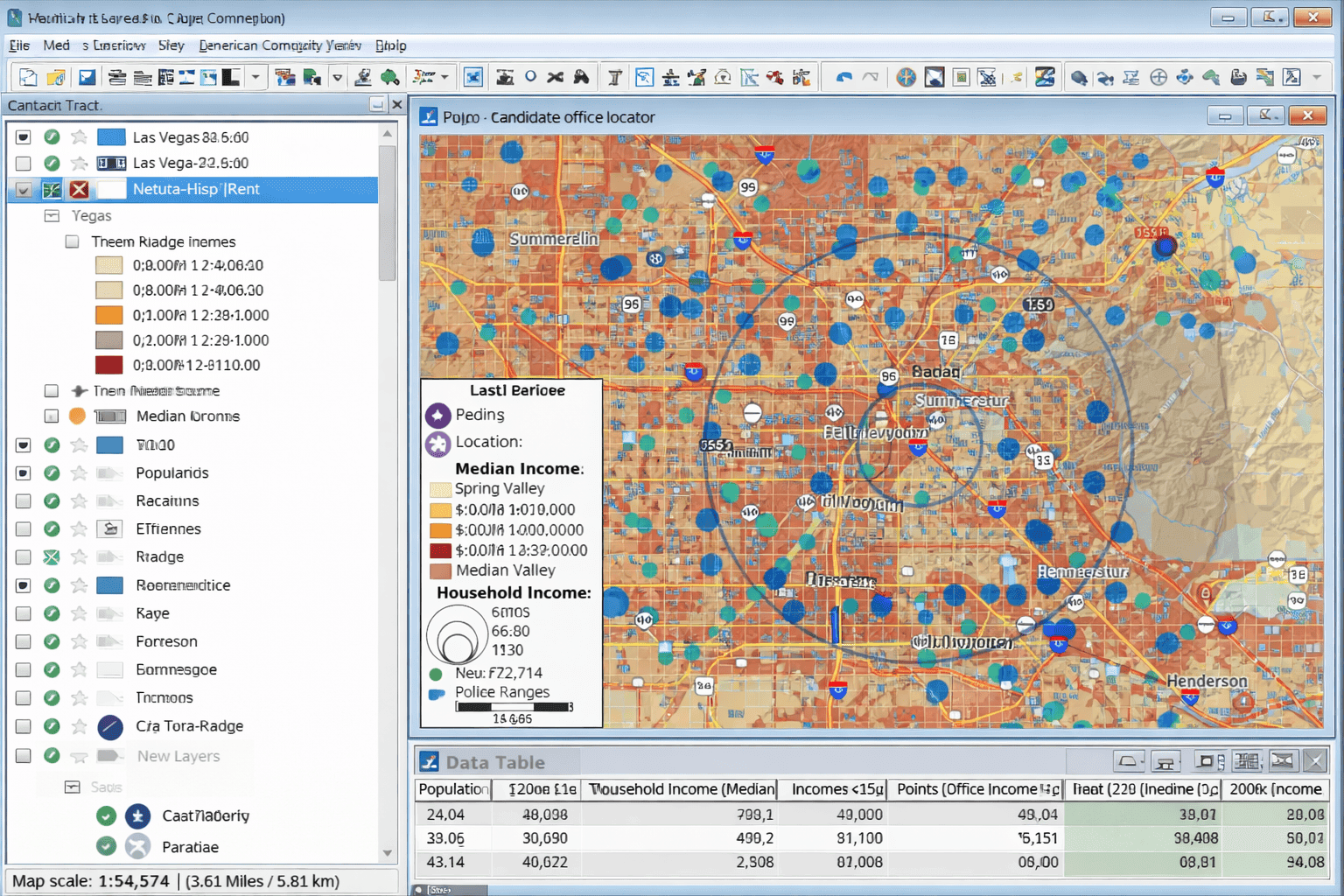
Most people encounter digital maps through navigation apps, but business GIS serves a very different purpose. Maptitude allows organizations to layer multiple datasets—addresses, boundaries, demographics, and imagery—into a single interactive workspace. The result is a map that functions as a visual analytics dashboard rather than a simple reference tool.
Even users new to GIS can begin quickly. While advanced analysis may require consultation of documentation or training videos, most tools are accessible immediately. Built-in wizards guide users through creating demographic maps, thematic displays, and analyses using both included datasets and external spreadsheets.
Image Placement 1
A Feature-Rich GIS for Business Users
Maptitude is not intended solely for route planning or static report graphics. Its real value lies in enabling organizations to ask complex geographic questions and visualize the answers clearly.
Priced at approximately $695 USD, Maptitude undercuts many competing professional GIS platforms while still offering advanced capabilities. Users can import geographic files, tabular datasets, or GPS data, then automatically geocode addresses from spreadsheets containing customer, sales, or operational information.
Mapped locations can be symbolized in multiple ways, including custom icons and dynamic labeling. This flexibility makes it easier to communicate insights to stakeholders who may not have GIS expertise.
One of Maptitude’s strongest areas is spatial analysis for business planning. Users can identify neighborhoods matching specific demographic criteria—such as income level, household composition, or age distribution—by filtering and layering data directly on the map.
Territory Design and Drive-Time Analysis
Territory creation is another standout feature. Users can build service areas using existing boundaries like ZIP Codes or counties, import predefined regions, or manually draw custom territories. As areas are defined, Maptitude continuously updates summary statistics, allowing planners to balance territories based on population, income, or other target variables.
Drive-time zones further enhance location analysis. These zones estimate how far someone can travel from a given point within a specified time. Unlike simplistic circular buffers, Maptitude’s drive-time calculations account for real road networks. In practice, the resulting shapes appear far more realistic than the rigid “starburst” patterns common in other tools.
Circular rings, 3D visualizations, hotspot analysis, site selection models, and routing tools round out an already robust analytical toolkit.
Image Placement 2

Deployment, Sharing, and Platform Support
Maptitude runs on Windows and is available in both 32-bit and 64-bit versions, supporting Windows XP through Windows 8. The 64-bit version offers notable advantages, including higher-resolution exports, greater memory utilization, and compatibility with 64-bit Microsoft Office applications.
In addition to desktop use, Maptitude Web applications allow maps to be accessed through browsers on PCs and mobile devices. Output options are extensive: maps can be printed or exported as PDF, JPEG, or bitmap files, embedded in Office documents, or shared through Google Maps or Google Earth for interactive viewing.
Built-In Data: A Major Advantage
Every Maptitude license includes a global basemap and one detailed country package at no additional cost. These packages contain high-quality street data, geocoding support, routing information, postal boundaries, political divisions, and extensive landmark coverage.
For U.S. users, the included data is particularly strong. ZIP Codes, Census boundaries, road networks, and American Community Survey variables are all provided. The underlying map data—sourced from Nokia Maps at the time—was widely regarded as among the best available and alone justified much of the software’s cost.
Demographics and Data Flexibility
Maptitude includes hundreds of demographic and economic variables at the ZIP Code level, covering population, age, income, education, housing characteristics, business activity, and more. Optional add-ons provide block-level Census data for users needing finer spatial resolution.
While the software does not include certain retail sales estimates, it does offer demographic projections, consumer expenditure data, and extensive ACS and Census datasets. Users can also seamlessly integrate their own data from Excel, Access, and other databases.
Performance and System Demands
Performance is generally excellent. Even complex maps load quickly on a system with 4GB of RAM. Installation, however, is sizable—exceeding 4GB—which can make downloads time-consuming.
Despite its resource requirements, Maptitude remains stable during use and does not monopolize system resources, even when running alongside other applications.
Final Verdict
Maptitude Mapping Software 2014 strikes an impressive balance between power and accessibility. Casual users can produce meaningful maps with minimal effort, while advanced users retain full control over analysis and presentation. The interface is clean, the tools are thoughtfully designed, and the feature set rivals far more expensive GIS platforms.
For organizations seeking to incorporate geographic analysis into everyday decision-making—without committing to enterprise-level GIS complexity—Maptitude is an outstanding choice. Its pricing, usability, and depth of functionality make it one of the most compelling business mapping solutions available at its price point.
About Caliper Corporation
Caliper Corporation develops advanced GIS, transportation, redistricting, and mapping software. As a privately held company, Caliper focuses on delivering professional-grade spatial analysis tools that emphasize usability and cost efficiency. Maptitude reflects this philosophy by enabling organizations to unlock the value of location-based data without excessive overhead.


